


Simple navigation function
The Simple navigation function displays the direction and straight-line distance from a current location to a goal or a start point.
Important
• The simple navigation function shows the direction and straight-line distance. It does not provide route (street) guidance.
• The simple navigation function cannot be displayed when the measurement screen is set to display 7 or 8 screen segments. Switch the screen by pressing MODE, or change the number of screen segments in screen customization.

Display goal
Display the direction and straight-line distance to the goal.
Important
This function cannot be used if no goal is defined.
* Goals can also be set while a trip is being recorded if the smart computer is in the [PAUSE] state.
Smart computer
1. Press OPTION on the measurement screen for 1 second to show simple navigation (goal) on the upper part of the screen.

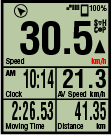
 (1 second)Measurement screenSimple Navigation display (goal)
Being able to check the direction and straight-line distance to a goal makes it possible to continue travelling without losing sight of the goal.
2. Press OPTION for 1 second to return to the measurement screen.
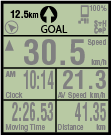 (1 second)Simple Navigation display (goal)Measurement screen
* Performing the same operation will display the simple navigation (goal) again.
* To go back to a start point, see "Back to start point".
Back to start point
Display the direction and straight-line distance to the start point.
* Because a trip's start point is set automatically, this function can be used right away.
Smart computer
1. Press OPTION on the measurement screen or on the simple navigation display (goal) to show simple navigation (back to start point) on the upper part of the screen.
 Measurement screenSimple Navigation display(start point)Simple Navigation display (goal)
This function allows you to return to a start point while checking the direction and straight-line distance to the start point.
2. Press OPTION to return to the measurement screen.
 Simple Navigation display(start point)Measurement screen
* Performing the same operation will display the simple navigation (start point) again.
Copyright © 2021 CATEYE Co., Ltd.