


2. Performing pre-measurement preparation
The following procedure shows how to turn various measurement functions ON/OFF and how to configure goal settings as desired.
This section also explains the quick set feature for quickly configuring settings from the Trip screen.
Smartphone
1. Tap [Quick Set].
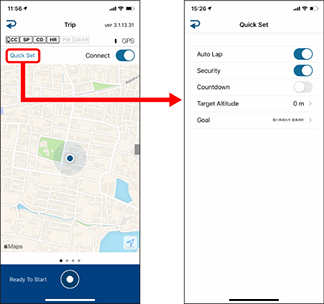
• Auto Lap
When turned ON, laps can be recorded automatically according to distance, time, or locations set in advance.
* Settings can be changed by tapping  (Other) > [General] > [Auto Lap].
 General
• Security
When turned ON, the security function set in advance will be enabled.
* Settings can be changed by tapping (Other) > [General] > [Security].
• Countdown
When turned ON, countdown from a goal (distance, time) set in advance will begin, and a notification will be generated when the goal is reached.
* Settings can be changed by tapping (Other) > [Device] > [PADRONE SMART+] > [Countdown].
Device
• Target Altitude
Sets an altitude as a goal.
• Simple Navigation
Specifies a goal in simple navigation.
3. Tap  (back).
The display returns to the Trip screen.
Copyright © 2021 CATEYE Co., Ltd.