


Activity list
It is possible to check individual activities (trip data and summary data collectively) saved in Cateye Cycling™.
Smartphone
1. Tap  (MENU) and then [Activity List].
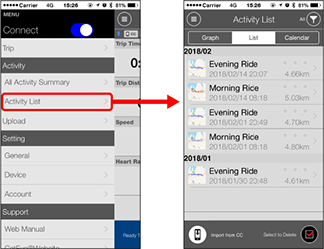
•  (Import from CC):
Displayed when summary data exists on the smart computer connected to the smartphone.

•  (Select to Delete):
Activities previously imported to a smartphone (Cateye Cycling™) can be deleted if desired.
Add a checkmark to the activities to be deleted, and tap the button to delete.
2. Tap each activity to check details or upload/delete it.
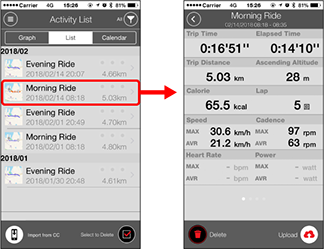
•  (Upload) :
Upload to service sites
•  (Delete) :
Delete activity
* In addition to numerical data, trip data can be displayed in map, graph, or lap format by swiping to the left or right.
Copyright © 2021 CATEYE Co., Ltd.