


Preparation before measurement
To use the auto lap or security function, the function must be turned ON before starting measurement.
Smartphone
1. Tap [Quick Set].
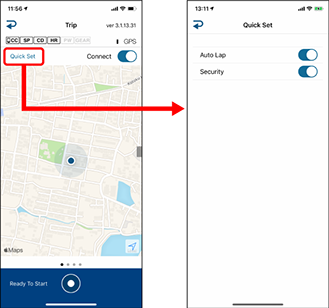
• Auto Lap
When turned ON, laps can be recorded automatically according to distance, time, or locations that were set in advance.
* Settings can be changed by tapping  (Other) > [General] > [Auto Lap].

• Security
When turned ON, the security function set in advance will be enabled.
* Settings can be changed by tapping (Other) > [General] > [Auto Lap].

3. Tap  (back).
The display returns to the Trip screen.
Copyright © 2021 CATEYE Co., Ltd.