
CATEYE PADRONE SMART
CATEYE STRADA SMART
Smartphone and smart computer

Activity List
You can check activities (the collective term for trip data and summary data) from the Activity List.
Smartphone
1. Tap  (MENU) and then [Activity List].
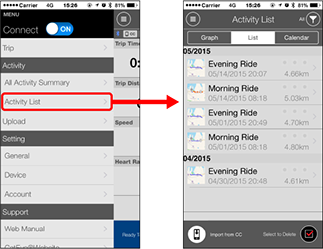
•  (Import from CC):
Displayed when summary data exists on the smart computer connected to the smartphone.

•  (Select to Delete):
Deletes activities previously imported to a smartphone.
Add a checkmark to the activities to be deleted, and tap the button to delete.
2. Tap each activity to check details or upload/delete it.
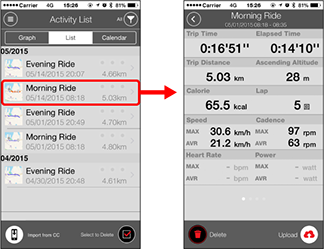
•  (Upload) :
Upload to service sites
•  (Delete) :
Delete activity
* In addition to numerical data, trip data can be displayed in map, graph, or lap format by swiping to the left or right.
Upload
Copyright © 2021 CATEYE Co., Ltd.