
CATEYE PADRONE SMART
CATEYE STRADA SMART
Smart computer

Smart computer screen

Details displayed:
 Data displayed at top of screen
Displays current speed.
* Can be changed to display heart rate or cadence.
 Display settings for top of screen
 Current function
Measured values change every time MODE is pressed.
* If the values flash on and off, it is time to replace the sensor battery.
• Speed/cadence/heart rate flash:
If using a CATEYE sensor, the values related to the sensor's battery replacement period start flashing to indicate that it is time to replace the battery.
* For the CATEYE sensor battery replacement procedure, refer to the sensor’s online manual.
• Power values flash:
When using separate left and right power sensors, power values flash on and off to indicate that only signals from one sensor are being received.
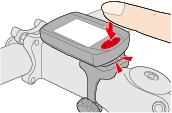
 Dot section (MODE button)
When the computer is mounted on the bracket, pressing the dot section depresses the MODE button.
Explanation of icons:
 (Battery alarm)
Flashes when smart computer's remaining battery power is low.
When this icon flashes, replace batteries as soon as possible.
 (Memory alarm)
This information is required when syncing with a smartphone. Measurement is not affected if this icon turns on.

 (Pace arrows)
Indicate whether the current speed is faster () or slower () than the average speed.
 (Sensor signal icon)
Indicates the Bluetooth® sensor's signal reception status.
*1: With the speed/cadence (ISC) sensor, S and C are displayed simultaneously.
• Types of icons:
S (Speed signal) *1
Indicates the speed sensor signal.
C (Cadence signal) *1
Indicates the cadence sensor signal.
H (Heart rate signal)
Indicates the heart rate sensor signal.
P (Power signal)
Indicates the power sensor signal.
• Icon states:
Flashing
Signal being received
Off
No signal
 (Tire size)
Displays the tire circumference during setup.
 •
•  •
•  •
•  (Measurement unit)
Displays the currently selected measurement unit.
• On
Measurement stopped
• Flashing
Measurement in progress
 (Average)
Indicates that the currently displayed value is an average value.
 (Maximum)
Indicates that the currently displayed value is a maximum value.
Current function
Indicates the currently displayed function.
•  (Total Distance)
•  (Elapsed Time)
•  (Heart Rate)
•  (Trip Distance)
•  (Trip Distance 2)
•  (Current Speed)
•  (Cadence)
•  (Power)
•  (Clock)